
Welcome to the first issue of The VideoDB Dispatch. We are starting this newsletter because video AI is moving fast, and many of the most interesting shifts are still hidden inside demos, repos, papers, workflows, and strange little experiments.
This is our place to share what we are noticing across multimodal models, agents, video infrastructure, and the things we are building at VideoDB.
The main signal: Agents will show their work through video
The next important output from an agent may not be a text answer. It may be a video stream.
A video artifact that carries the work: what the agent saw, tried, broke, fixed, and verified.
As agents move from chat boxes into browsers, terminals, editors, remote desktops, dashboards, and live workflows, more of their work becomes visual. A final text response can say “done.” Logs can show commands. But neither captures the full shape of a run: wrong turns, failed installs, hidden popups, and the moment something finally works.
That is why video is the native artifact of agent work.
We have this running with our OpenClaw agent in Slack. Instead of cloning a repo, setting up dependencies, and wondering whether it works, the team can tag the agent with a GitHub URL and watch a video of the repo being tried.
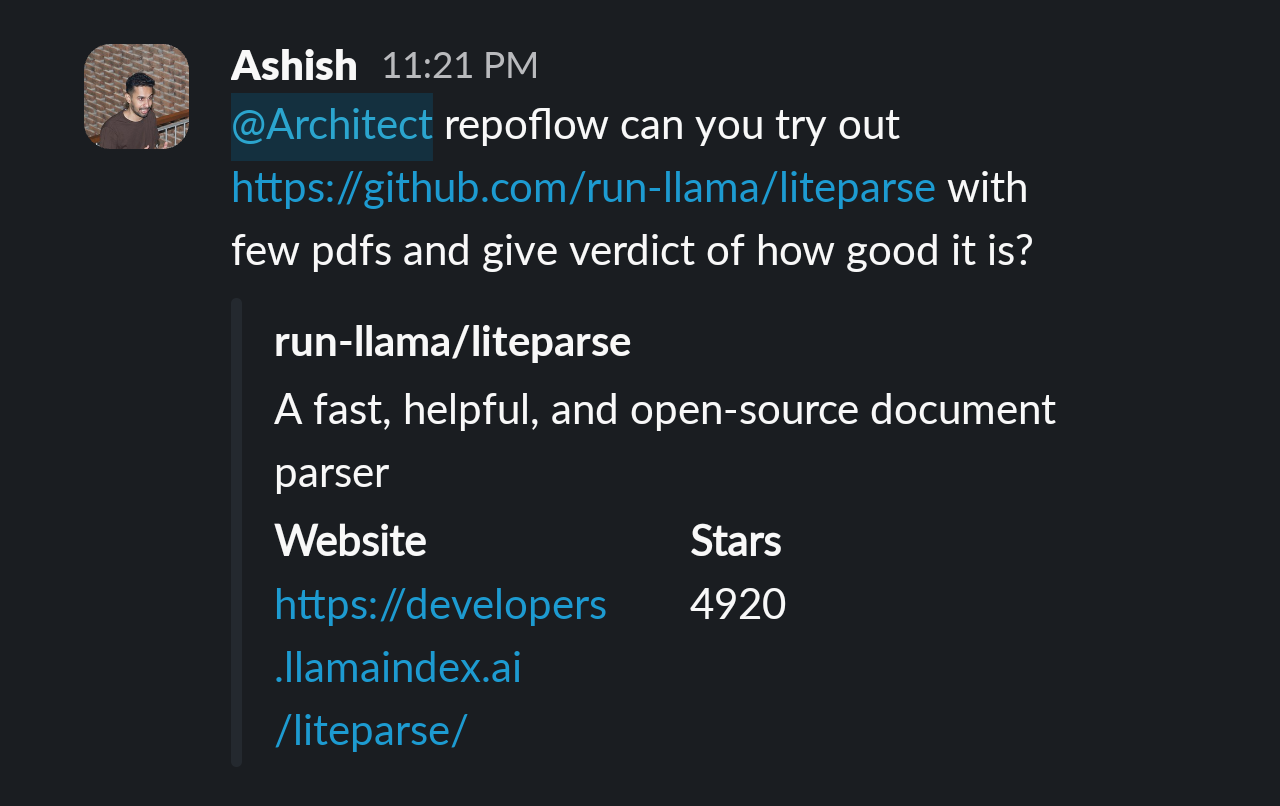
Here’s a sample video output by agent: watch the agent run
At first, this looks like monitoring. Record the run, stream it live, replay it later, and search for the moment something happened.
Then it becomes proof. The agent can show the path it took, not just claim that the task was completed.
Soon after, it becomes an interface. Ask an agent to try a GitHub repo, and it returns a first person walkthrough. Ask it to research a topic, and it returns a sourced video briefing. Ask it to inspect a workflow, and it gives you the exact visual trail behind its conclusion.
We think this pattern will show up across debugging, QA, repo review, research, support, education, and internal operations.
Here are three experiments from our side:
- Video as computer use response
Record and index computer use sessions so agent runs can be watched live, replayed later, and searched by what happened on screen.
GitHub repo - Video as Research outcomes
Give an agent a topic and get back a sourced video assembled from research, real assets, narration, and review.
GitHub repo
Samples: US Iran news digest, financial market report - Video walkthroughs
Give an agent a GitHub repo and a goal. It sets up the project, runs it, records the experience, and narrates what happened in first person.
Try it here: TryMyRepo
Research note: How much should a video model think?
We published a paper on a practical question in video understanding:
Does giving a vision-language model more “thinking” actually improve scene understanding enough to justify the cost?
In our benchmark on Gemini vision language models across scenes extracted from 100 hours of video, we studied how internal reasoning traces, which we call thought streams, affect the final scene outputs.
A few findings stood out:
- More thinking helps, but the gains plateau quickly in this setup.
- Most improvement happens in the first few hundred thought tokens. Beyond roughly 700 tokens, the model spends more while quality improves more slowly.
- Flash Lite 1024 was the quality leader in our benchmark while using fewer thought tokens than Flash Dynamic.
- Tight reasoning budgets increased hallucination during the compression step. The final answer was more likely to include details that were not clearly present in the observable reasoning trace.
The practical takeaway: production video understanding is not only about model quality. It is also about cost, efficiency, and trust. If a model spends significantly more reasoning tokens for a small quality gain, that changes how you design indexing pipelines.
Read the full paper: Thought streams for video scene understanding
A thing worth seeing: Flipbook
Flipbook is a delightful experiment: an infinite visual browser where every page is generated on demand as an image. Click anywhere to explore that part of the image in more depth.
It feels like an early glimpse of a more visual web, especially with their experimental live video stream mode where generated images, interactive browsing, and video streams start blending together.
Build idea: Create your own personalized video agent
If you want to try the agent video direction, start with Agentic Streams.
We have been experimenting with agents for news digests, market reports, and topic based video briefings. The interesting part is personalization. You can have scheduled video breifings about topics.
Instead of asking for a generic video, give the agent a beat, sources, format, and taste.
“Make me a 3-minute weekly video on open-source AI launches. Use GitHub trending, Hacker News, X posts, and YouTube demos as sources. Keep the tone technical and concise. Show links, screenshots, and clips as proof.”
What’s new in VideoDB
Organization management for VideoDB Console
We shipped Organization Management in VideoDB Console for Pro users.
You can now invite team members into your organization so they can access shared VideoDB assets in VideoDB Console and manage API keys together.