
How I Built a Real-Time Meeting Copilot in a Day
By the VideoDB Team
A lot of my important conversations have gone sideways because I was too busy talking instead of actually listen. Or I've walked out of a call and realised I never asked the one question that mattered. Notes don't really fix it, they just split your attention. Recordings fix it even less; by the time you replay one, the follow-up window is already gone.
So I built Call.md. It sits alongside any call, records both sides as separate streams, transcribes them live, watches how the conversation is going, and taps me on the shoulder when something needs my attention. When the call ends, it drops a clean Markdown file on my machine with a summary, key points, and action items.
It runs on VideoDB, it's open source as call.md, and on macOS it installs in one line.
What It Looks Like in Practice
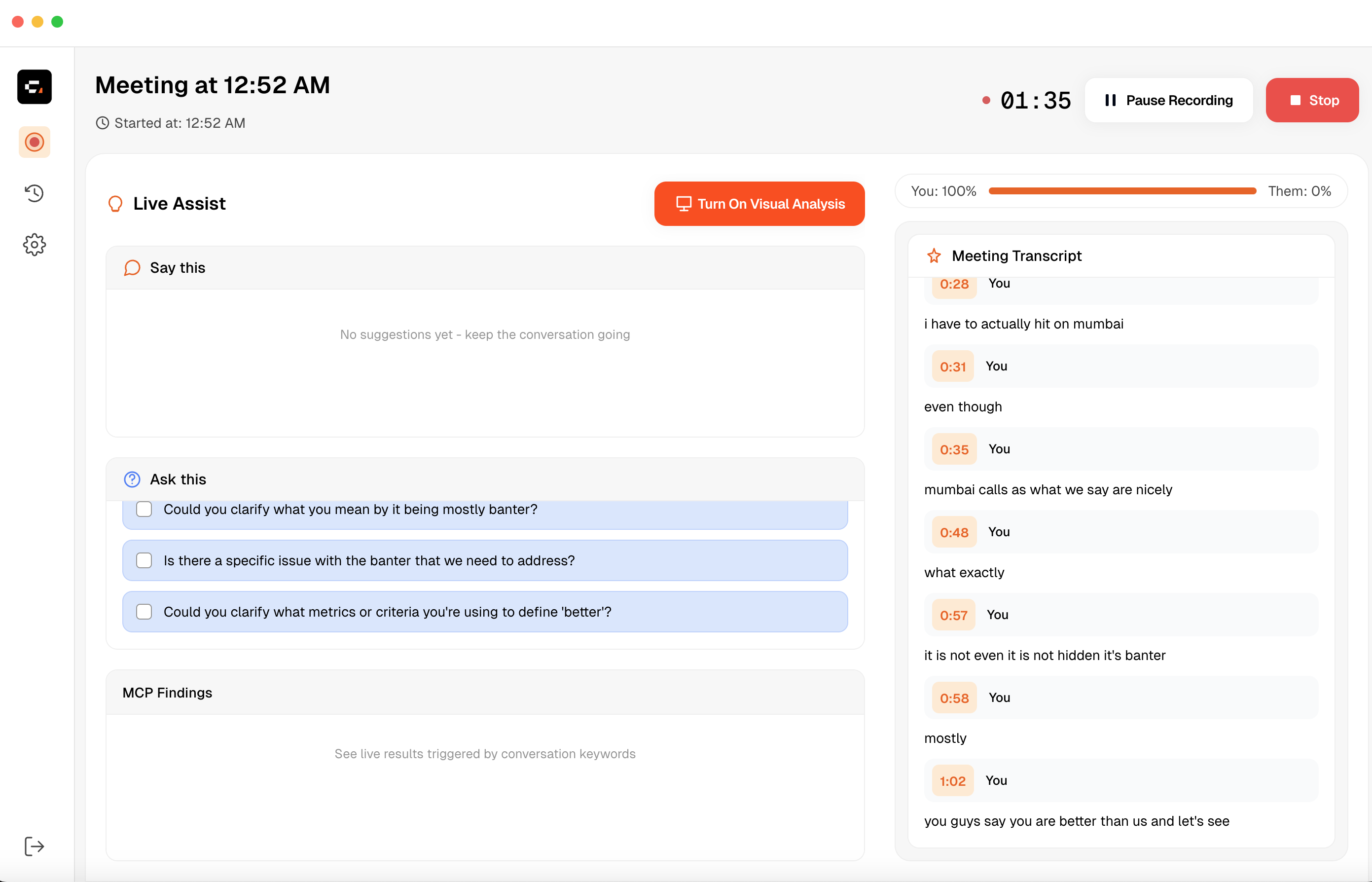
Here's the app mid-call.
The left side is a live assist panel with three sections:
- "Say This" surfaces lines I can drop into the conversation when I'm blanking.
- "Ask This" offers the questions I should be asking, including the ones I'd otherwise forget.
- "MCP Findings" only shows up when I've connected MCP servers; a background agent listens to the transcript and decides when to hit an external tool. Mention a "Q1 Checklist doc" and it quietly pulls the page out of my Notion workspace while I keep talking.
The right side shows conversation health and streams the live transcript.
The Core Idea
Most meeting tools treat audio as something to store and play back later. I wanted to invert that. What if the transcript were a live data stream I could make decisions off, while the call is still going?
Once you frame it that way, the rest of the design follows. Audio comes in, gets transcribed immediately, runs through a pipeline, and produces output I can actually use during the meeting. Coaching. Metrics. Suggested questions. All of it, while I'm still on the call.
Before a call, I describe the meeting context and the app generates probing questions and a checklist. During the call, both audio channels are tracked independently, each speaker transcribed separately, and the intelligence pipeline produces the suggestions, lines, and MCP findings I see in the UI. When the call ends, it generates a three-part summary and writes the whole thing to Markdown. If I've configured a webhook, the structured payload goes out to whatever I've wired it to — n8n, Zapier, a CRM.
How the System is Wired Together
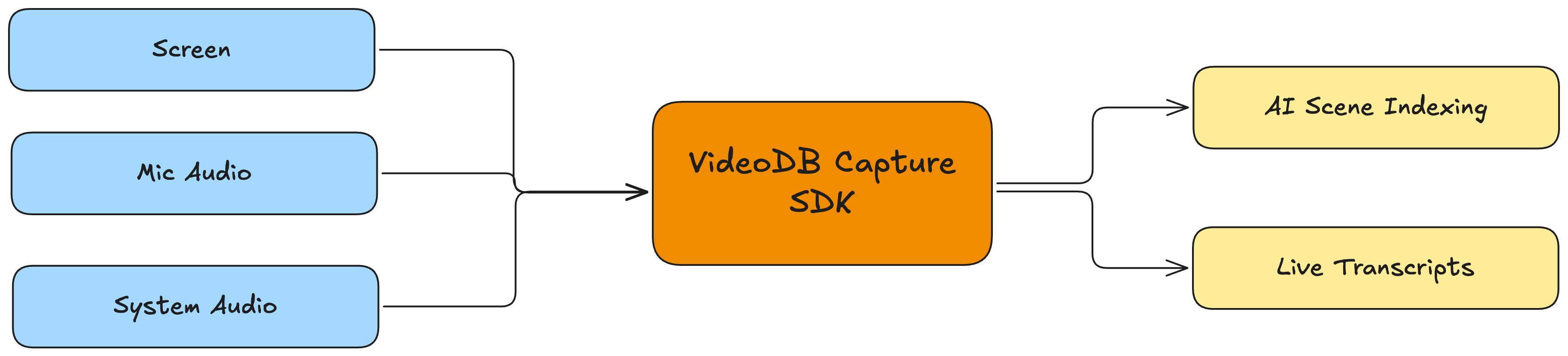
Before the code, the rough shape. Two audio channels and the screen go into VideoDB as separate tracks. Transcripts and scene indexes come back over WebSockets and feed a single orchestrator, which fans them out to small services: metrics, nudges, an MCP agent, and a buffer the post-call summary will eventually read. Everything is event-driven, all storage is local SQLite, and every AI call goes through one OpenAI-compatible endpoint so swapping models is a config change. After the call, the summary writes to Markdown and an optional webhook fires the structured payload to whatever you've wired up.
The tech stack underneath all of this:
| Layer | Technology |
|---|---|
| Desktop runtime | Electron 34 |
| Language | TypeScript 5.8 |
| Frontend | React 19 + Tailwind CSS + shadcn/ui |
| IPC layer | tRPC 11 + Hono |
| Database | Drizzle ORM + SQLite |
| State management | Zustand |
| Transcription + AI | VideoDB SDK 0.2.4 |
| Tool integrations | MCP SDK 1.0.0 |
Step 1: From Permissions to Live Transcripts with VideoDB Capture
The whole app sits on top of this piece. Everything further down the pipeline (coaching, nudges, MCP, summaries) assumes it already has a clean per-speaker transcript streaming in. The job of getting there, from raw OS audio and video to that live stream, is what VideoDB Capture handles, and I want to walk through how it does it because the rest of the post makes more sense once you see it.
The capture problem, written out: three OS resources need to come off the machine at the same time. The microphone. The system audio mix. The screen. Each has to stay on its own track, macOS permissions have to be negotiated without a browser, and each track has to be routed into something that turns it into useful data (transcripts for audio, scene indexes for video). If you were writing this yourself from scratch, you'd be building a ScreenCaptureKit and CoreAudio capture layer, a permission orchestrator, an upload protocol, and a transcription backend before you ever got to touch the product.
The VideoDB Capture SDK is two halves that snap together and skip all of that:
videodb/capturehandles the OS side. ACaptureClientenumerates the mics, system audio sources, and displays available on the machine, asks for whichever permissions it needs, and streams each channel into VideoDB.videodbhandles ingestion. ACollectionowns the recording, aCaptureSessionis the live handle, and each channel has its own WebSocket back to the client that delivers transcript and scene-index events as they're produced.
The two sides reference the same underlying recording via a single sessionId: the ingestion session is minted from the collection, and the CaptureClient uses that same id when it starts capturing.
Here's the whole bootstrap I run when a meeting starts:
// 1. Ingestion side: get the user's collection, mint a CaptureSession + short-lived token.
const conn = connect({ apiKey });
const collection = await conn.getCollection(collectionId);
const session = await collection.createCaptureSession({ endUserId });
const sessionToken = await conn.generateClientToken(expiresIn);

// 2. Capture side: CaptureClient is pointed at the same session via its token.
const captureClient = new CaptureClient({ sessionToken });

// 3. Ask VideoDB what's actually available on this machine.
//    This is also where macOS Mic / Screen Recording prompts surface.
const channels = await captureClient.listChannels();

// 4. Pick one track per resource and declare what each is for.
await captureClient.startSession({
  sessionId: session.id,
  channels: [
    { channelId: channels.mics.default.id,        type: 'audio', record: true, transcript: true },
    { channelId: channels.systemAudio.default.id, type: 'audio', record: true, transcript: true },
    { channelId: channels.displays.default.id,    type: 'video', record: true },
  ],
});
Two things worth calling out here.
Permissions become the SDK's problem instead of mine. listChannels() is where the macOS Microphone and Screen Recording prompts actually fire. If the user hasn't granted access, the SDK knows which channel is missing and reports it back, so I never have to touch TCC.db or wire up my own permission orchestrator. The same call is also what lets the app degrade gracefully when there's no system audio device available, or no second microphone.
The channels array carries most of the app's design thinking in a few lines. Three separate tracks, each with its own channelId, each flagged record: true and (for audio) transcript: true. The two audio streams are never mixed together, which is how the me vs them distinction survives into the transcript. That flag is also where live transcription gets turned on: flip it, and the channel's audio is run through VideoDB's transcription pipeline as the bytes stream in, not after the call wraps up. The video channel opts into scene indexing through the same shape, so audio and video use one mental model instead of two.
Once the session is live, each channel has a WebSocket feeding events back. I use the same sessionToken to open an ingestion socket, and after that the consumer is an async iterator:
const wsConnection = await connect({ sessionToken }).connectWebsocket();
const ws = await wsConnection.connect();

for await (const msg of ws.receive()) {
  if (msg.channel === 'transcript') {
    // { text, is_final, start, end, source: 'mic' | 'system_audio' }
    handleTranscriptSegment(msg);
  } else if (msg.channel === 'scene_index') {
    // { scene, start, end, tags } — produced from the screen track
    handleSceneIndex(msg);
  }
}
One more thing about the consumer side. Each transcript message carries an is_final flag. Partials go straight into the live UI so the transcript log feels real-time, but the buffer that metrics, nudges, and the MCP agent read from only advances on finals. That way downstream services see stable text instead of having to debounce mid-utterance edits.
That for await loop is the whole surface that capture exposes to the rest of the app. Audio becomes labelled transcript segments. The screen track becomes a stream of indexed scenes with timestamps and tags. Every service downstream of this (metrics, nudges, MCP, the post-call summary) is built against that single shape, so the capture-to-intelligence pipeline ends up looking roughly like:
[ screen, mic, system audio ]
          ↓   (CaptureClient.startSession)
     [ VideoDB Capture ]
          ↓   (per-channel WebSocket)
[ transcripts, scene indexes ]
          ↓
    [ intelligence layer ]
          ↓
  [ end-of-meeting export ]
The rest of this post lives on the right-hand side of that arrow. I got the app running in a day because none of what's on the left is mine to write: permissions, dual-channel capture, uploads, transcription, scene indexing, all of that is what the SDK is for. Each recording also lands in its own VideoDB collection, which means weeks later I can still pull a transcript, search inside a scene, or run another enrichment pass without re-ingesting the call.
Step 2: The Orchestrator
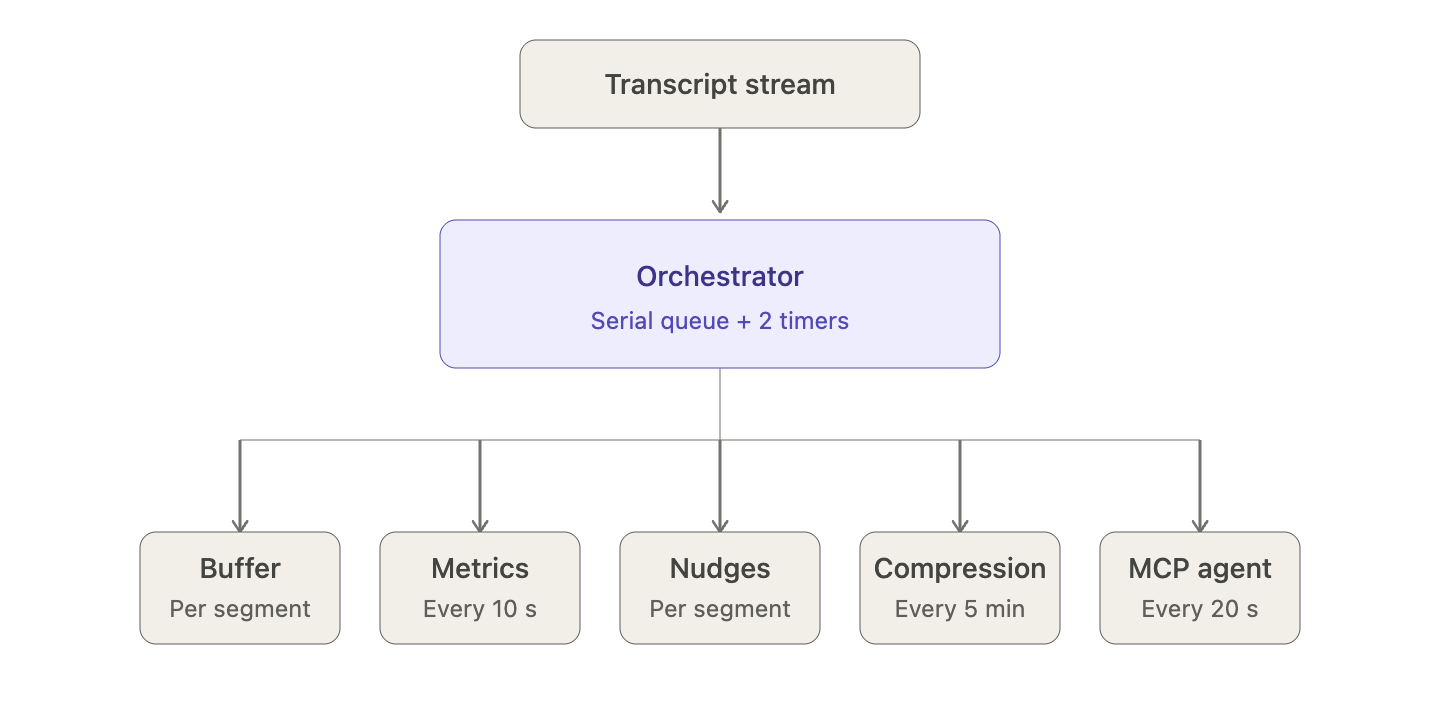
All of the intelligence work sits behind a single coordinator. When a transcript segment comes off the WebSocket, the orchestrator decides who gets a copy: the metrics engine, the nudge engine, the MCP agent, the buffer that the post-call summary will eventually read. Each of those is a small service that does one thing, and they're wired together with events rather than a god class.
Two timers run for the life of the call:
- Metrics timer fires every 10 seconds, recomputes things like talk ratio, pace, and question rate from the live buffer, and pushes the new values to the UI.
- Compression timer fires every 5 minutes and asks an LLM to summarise any transcript older than 5 minutes, so the in-memory context doesn't grow without bound.
Most meeting tools skip the second one, which is also why most of them are fine on a 20-minute standup and terrible on an hour-long call.
The compression doesn't throw much away. Segments newer than 5 minutes stay verbatim, because that's the window the nudge engine and MCP agent are still reading from. Anything older gets replaced with a compressed chunk: a 3–4 bullet summary of what was discussed, a list of topics that came up, and the "important moments" flagged by type — objection, commitment, question, pain point, decision — each with its timestamp. The sentence-level phrasing gets dropped because nothing downstream was using it anyway. And the post-call summary doesn't read from this compressed view at all; it pulls the full transcript fresh from SQLite (see Step 5), so compression only ever shapes what the live pipeline sees mid-call.
Transcript segments go through a serial queue instead of being handled inline. If a bunch of them arrive in a burst, they don't race each other into the metrics or nudge engines.
Step 3: The Nudge Engine
Nudges were the hardest product problem in the whole app. If they fire too often, people learn to tune them out. If they fire too rarely, nothing actually changes. What I landed on is a hard 2-minute cooldown sitting behind the metrics timer, and a priority-ordered walk through four conditions that returns at most one nudge per pass.
- Talk ratio. If I've been talking more than 65% of the time, the engine fires a low-severity nudge. Over 75% and it escalates. This check only turns on after the first 60 seconds so opening pleasantries don't set it off.
- Questions. Once the call is past the 3-minute mark, the engine expects roughly one question every 2 minutes, and anything below half that rate triggers a discovery nudge.
- Pace. Anything over 180 words per minute gets flagged. Normal conversational English sits around 130 WPM, so 180 is noticeably fast and genuinely harder for the other person to follow.
- Next steps. A reminder goes out automatically at both the 20-minute and 30-minute marks. These are the ones that quietly save me the most follow-up damage.
Every nudge carries an actionType: ask_question, pause, clarify, or confirm. The UI maps it to a suggested action instead of throwing up a generic alert.
Step 4: MCP — Tools That Activate Themselves
This is the piece that stops the app feeling like a recorder and starts making it feel like something actively in the call with me. The design brief for the agent was deliberately narrow. Stay quiet by default. Only speak up when the conversation has produced a real information need, and the tools I've connected can actually answer it. Never flood the panel with noise. What follows is mostly guardrails to stop that last thing from happening.
The agent doesn't look at every transcript segment. It wakes up every 20 seconds while the call is active, and that 20-second tick is the only cadence in the system. No keyword trip-wires. No per-utterance listener racing the LLM. Just one regular heartbeat, which is most of the reason the agent feels calm instead of twitchy.
Each tick reads three inputs:
- The last 20 seconds of transcript from a 60-second rolling buffer, tagged per speaker as
[You]and[Them]. - The full set of tools every connected MCP server currently exposes, aggregated into one flat list and converted into OpenAI function-calling format.
- A short history of prior ticks, capped at 10 messages, so the agent remembers what it already fetched and doesn't re-ask.
All three go into a single LLM call with a deliberately blunt system prompt:
Your only job: when the conversation creates an information need that your
tools can answer — fetch it and present it. Otherwise, return nothing.
...
- Don't repeat a fetch already made this session unless explicitly asked again.
- Don't summarize the meeting or narrate your reasoning.
- Silence is your default. An empty response is correct.
From there the agent runs a bounded agentic loop. The shape is roughly:
repeat up to MAX_TOOL_CALLS_PER_RUN (3):
    response = LLM(messages, tools)
    if response.tool_calls:
        for each tool_call:
            result = orchestrator.execute(tool_call)
            messages.append(tool result)
        continue
    return response.content   // may be empty
Each tool call is routed through a ConnectionOrchestrator that knows which MCP server owns which tool. It executes the call, puts the JSON result back into the message thread, and lets the LLM look at it on the next turn. From there the LLM either asks for more tools, returns a final markdown block, or returns nothing. The 3-call cap on every tick is the second guardrail: even if the model gets overeager, it can't launch more than three tools before the tick ends. I also maintain a previousQueries set keyed on toolName:args, so the agent has a concrete view of what it's already fetched, which backs up the "don't repeat yourself" clause in the prompt.
When the loop ends, one of two things is true:
- The final response is empty (the common case), the tick is a no-op, and the panel stays exactly as it was.
- Or the response has content, in which case it's emitted as an
MCPDisplayResultand shown in the MCP Findings panel as markdown. The conversation history grows by a turn (still capped at 10 messages) so the next tick has continuity without the context window blowing up.
Net shape: a 20-second clock, a 3-call budget, a deduped history, and silence as the default outcome. Connecting MCP servers from Settings (either local stdio or remote http) just adds entries to the tool list. Everything above keeps working the same way no matter which tools are wired in. That's how the app ends up feeling like it's in the meeting with me without ever talking over me.
Step 5: Post-Call Summary
The capture session closes when the call ends, but the VideoDB side of the pipeline is still useful after that. The transcript has already been ingested and indexed at the collection level, so generating a summary is a single SDK call against the video I just recorded, using the same API key I used for capture. Nothing needs a second pipeline and nothing gets re-uploaded.
The summary service reads the full transcript fresh from SQLite rather than the in-memory buffer, because the in-memory one might have been compressed mid-call. Then it runs three extractions in parallel:
- A two-to-three-sentence narrative overview.
- A topic-clustered key-points list attributed by speaker.
- An action-items list with implied owners and timelines.
Running them in parallel keeps the total under 10 seconds even for a 45-minute meeting.
Each extraction is a generateText call against the collection, pinned to VideoDB's highest-quality tier since I don't care about latency once the call is over:
const prompt = `Analyze the following meeting transcript and generate a
comprehensive meeting report in markdown format.

## Meeting Summary
## Key Discussion Points
## Key Decisions

Transcript: ${transcriptText}`;

const result = await collection.generateText(prompt, 'ultra');
The same SDK surface lets me enrich the video itself, not just extract text from it. A single video.indexSpokenWords() call builds a word-level index over the recording. That index is what makes old meetings actually searchable: I can jump to the exact moment someone mentioned a topic instead of scrubbing the timeline looking for it.
const video = await collection.getVideo(videoId);
await video.indexSpokenWords();
The output is written to ~/.call_md/[meeting-name]-[timestamp].md with the full transcript under the summary. If I've wired up a webhook, the structured payload fires right after. The recording itself stays in the collection, already indexed and queryable, so a call from last quarter is as reachable as one from this morning.
Local-First Storage
All data lives on your machine:
~/Library/Application Support/call-md/
├── data/
│   └── call-md.db
└── logs/
    └── app-2025-xx-xx.log
The schema sits on Drizzle ORM with type-safe migrations. There's no cloud storage and no third-party access. The only outbound traffic is the capture streams going to VideoDB for transcription and scene indexing, plus the LLM calls for the intelligence pipeline, and both are authenticated with your own API key.
I didn't do this purely as a privacy talking point. The kinds of conversations people actually record with this thing include customer calls, internal strategy, and numbers they'd rather not send somewhere else. If the data doesn't leave the machine, there's nothing for me to promise about protecting it.
Try It
One command on macOS:
curl -fsSL https://artifacts.videodb.io/call.md/install | bash
Launch from Spotlight, add your VideoDB API key (free to start), grant Microphone and Screen Recording permissions when prompted, and that's it.
For developers who want to look at the code:
git clone https://github.com/video-db/call.md.git
cd call-md
npm install
npm run rebuild
npm run dev
The project splits cleanly into:
src/main/— the Electron main processsrc/renderer/— the React frontendsrc/shared/— types and Zod schemas used across both
What's Next
MCP has the most room to grow. Right now the agent reacts to what it hears, and the next version should pre-load context before the meeting even starts, based on what I put in the setup wizard. I want to walk into a call with the relevant pages, CRM records, and docs already in the panel.
Beyond that, I've got:
- Linux support partly drafted on the main process side
- Deeper CRM integrations that can create tasks rather than just fire webhooks
- Room for coaching frameworks other than MEDDIC
- A team mode where shared intelligence follows a group around instead of staying on one laptop
If I could hand you one thing from this build, it would be the reframe. A live transcript isn't a recording that happens to be in progress, it's a data stream you can program against. The moment you accept that, coaching, nudges, tool calls, and summaries stop being separate features and start being different consumers of one pipeline. The whole codebase is organised around that shift, and it's also where the most interesting things I haven't built yet would live.
The repo is open at github.com/video-db/call.md. The part I'd most like help on is the MCP agent. The 20-second tick works, but smarter triggering, cleaner deduplication, and proper pre-fetch strategies are all still open. If any of that sounds like your kind of problem, open an issue and let's talk.
Built by the VideoDB team. Grab a free API key at console.videodb.io. The community lives on Discord.